Please Note: Customer service will be closed on Monday Oct. 13th, 2008.
Panasonic TH42PH11UK 42 inch Plasma Tv Screen

HDTV Plasma Tv Screens and LCD TV for Home Theater

Monthly Specials on Plasma TV Screens, LCD Monitors, Video Projectors and Home Theater Accessories AVDeals Contact Information AVDeals Return Policy AVDeals Frequently Asked Questions View Shopping Cart


Home

Plasma TV
LCD TV Monitors
DLP TV
home theater video projector Video Projectors
Projector Screens
Home Theater Audio
Home Theater Video
Wall Mounts & Stands
AV Accessories
Home Automation
Car Audio/Mobile Video
Security Systems
CD / DVD Duplication
Portable Audio/Video
PA & DJ Equipment
Digital Cameras
Cordless Phones
Extended Warranty

Our Plasma Picks

Learning Resources

GSA / Government Purchasing Info

Plasma TV Shipping  Info

FREE SHIPPING on all home theater products including Plasma TV, LCD TV Monitors, Video Projectors, Projection Screens, DVD Players, and DVD Recorders

Most products are shipped 3 day Fedex within 24 hours. Monday to Friday we will do our best to ship same day as ordered. Next Day Air is available at an additional charge.

Heavy items such as subwoofers are shipped by UPS Ground

Our Other Sites

www.plasma.com

© 2008 Avdeals America


Firmware Upgrade Instructions For Jaton PSD-7611
Region-Free DVD Player

This upgrade will automatically install the latest features and filters under the following menu items on your Jaton psd-7611 Region-Free DVD Player. These features include...

  • Format Conversion

  • Chroma Filter

  • Horizontal Filter

  • Vertical Filter

  • Y Delay

  • Vertical Interpolation

  • Deinterlace Mode

  • Widescreen Conversion

We recommend changing the Vertical Interpolation setting to Adaptive to improve picture clarity during PAL to NTSC conversion.  These items can be found under the menu headings Video -> Video Display

Instructions

  1. Adaptec Easy CD Creator users download the updated Jaton image file here
    Non Adaptec (Nero) users see bottom of page

    If you purchased the Jaton psd-6711 from AVDeals.com or Plasma.com and do not have a CD recorder, you can have the firmware upgrade CD shipped to you by FedEx for only $4.99 US.  Please contact us for more information.
     

  2. Using a CD-R (not CD-RW) create a CD from the image you just downloaded.
     

  3. Insert CD into Jaton DVD Player. Screen will read FIRMWARE UPGRADE.
     

  4. Press UP on DVD Player or Remote. At this point the screen will go blank for approximately 3 minutes.  Do NOT power off the machine at this time!
     

  5. Welcome screen appears, firmware upgrade writing comes up again, remove upgrade disc and power down machine.

Non Adaptec Users

  1. Download the following files file1 file2
     

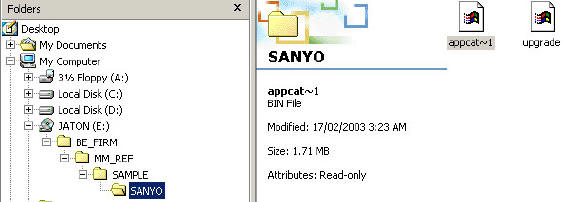
  2. Burn these 2 files onto a CD-R using the following tree layout. Use iso9660 when burning the CD.


  3. Insert CD into Jaton DVD Player. Screen will read FIRMWARE UPGRADE.
     

  4. Press UP on DVD Player or Remote. At this point the screen will go blank for approximately 3 minutes.  Do NOT power off the machine at this time!
     

  5. Welcome screen appears, firmware upgrade writing comes up again, remove upgrade disc and power down machine.
Back to Jaton PSD-7611 DVD Player


home  | contact | FAQ | return policy | learning resources
© 2004 Avdeals America